Multi-Currency, Multi-Valuation: Costing Materials for Global Manufacturers in S/4HANA
How Material Ledger, Parallel Valuation and Universal Parallel Accounting let one material carry the right cost in every currency, every entity and every accounting view.
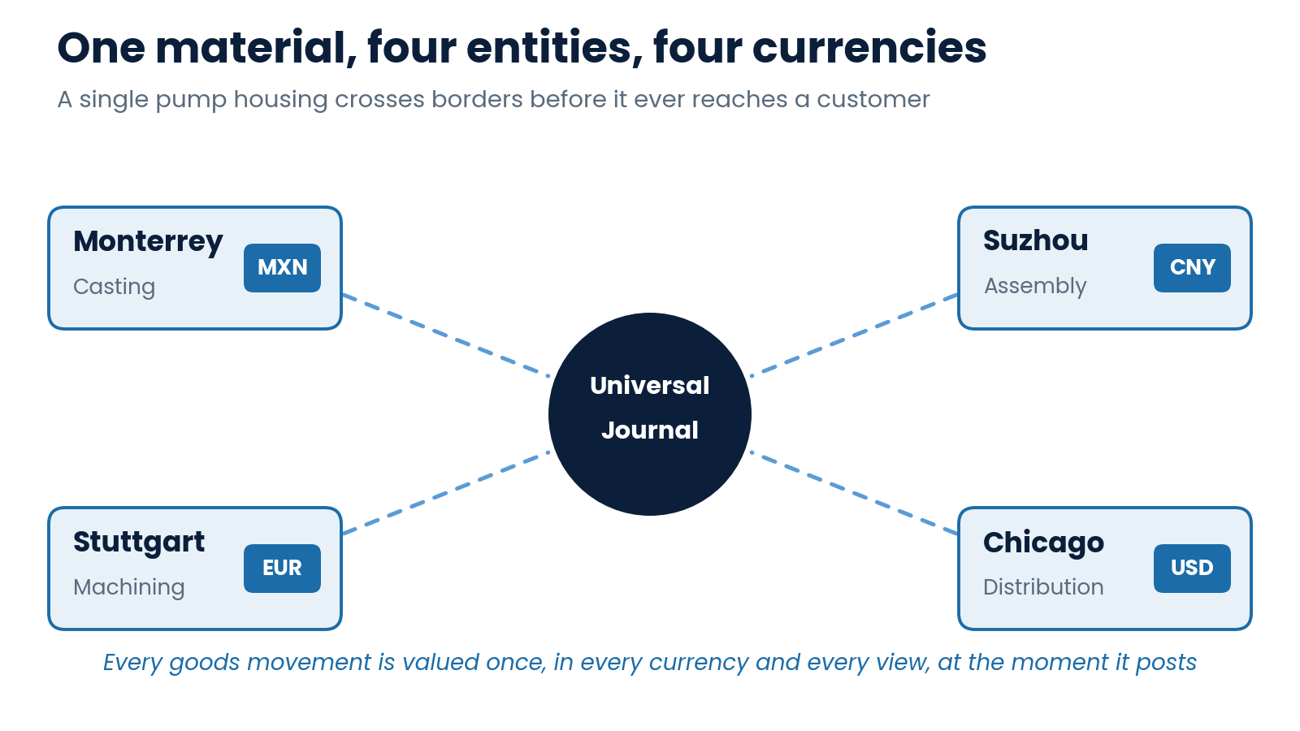
A pump housing is cast in Monterrey, machined in Stuttgart, assembled in Suzhou and sold out of a distribution center in Chicago. By the time it reaches a customer it has crossed three borders, four currencies and at least two sets of accounting rules.
The plant controller in Mexico wants its cost in pesos. The German statutory auditor wants it in euros under local GAAP. Group finance wants it in US dollars, at cost, with every intercompany margin stripped out. And the profit center manager in Stuttgart wants to know whether the machining operation actually made money on the transfer.
In most legacy ERP landscapes those four answers come from four different places: the ERP system, a spreadsheet, a consolidation tool and somebody's memory. SAP S/4HANA was designed to collapse them into one posting. This article explains how multi currency and multi valuation costing works in S/4HANA today, what changed with Universal Parallel Accounting (UPA), and which decisions global manufacturers should make before they configure a single currency type.
Why Global Manufacturers Need More Than One Number
Exchange rate swings, tariff driven sourcing changes and constant supply chain reshuffling have made one thing very clear for manufacturing finance teams: the cost of a material is not a single number. It depends on who is asking, and in which currency. A global manufacturer typically needs three valuation views running side by side:
· Legal valuation: what each legal entity reports under its local GAAP, including any intercompany profit it paid for at transfer price.
· Group valuation: what the material actually cost the corporate group as a whole, with intercompany margins eliminated.
· Profit center valuation: what the material cost when measured at internal transfer prices between profit centers, so each manager's performance is visible.
Then multiply each view by the currencies you need: company code currency, group currency, and often a hard or index currency for operations in high inflation economies. Without a system that captures all of these at the moment of the goods movement, finance teams end up rebuilding them at month end. Rebuilding is where margins get distorted, where profit in inventory is estimated instead of calculated, and where exchange rate effects quietly hide inside cost of goods sold.
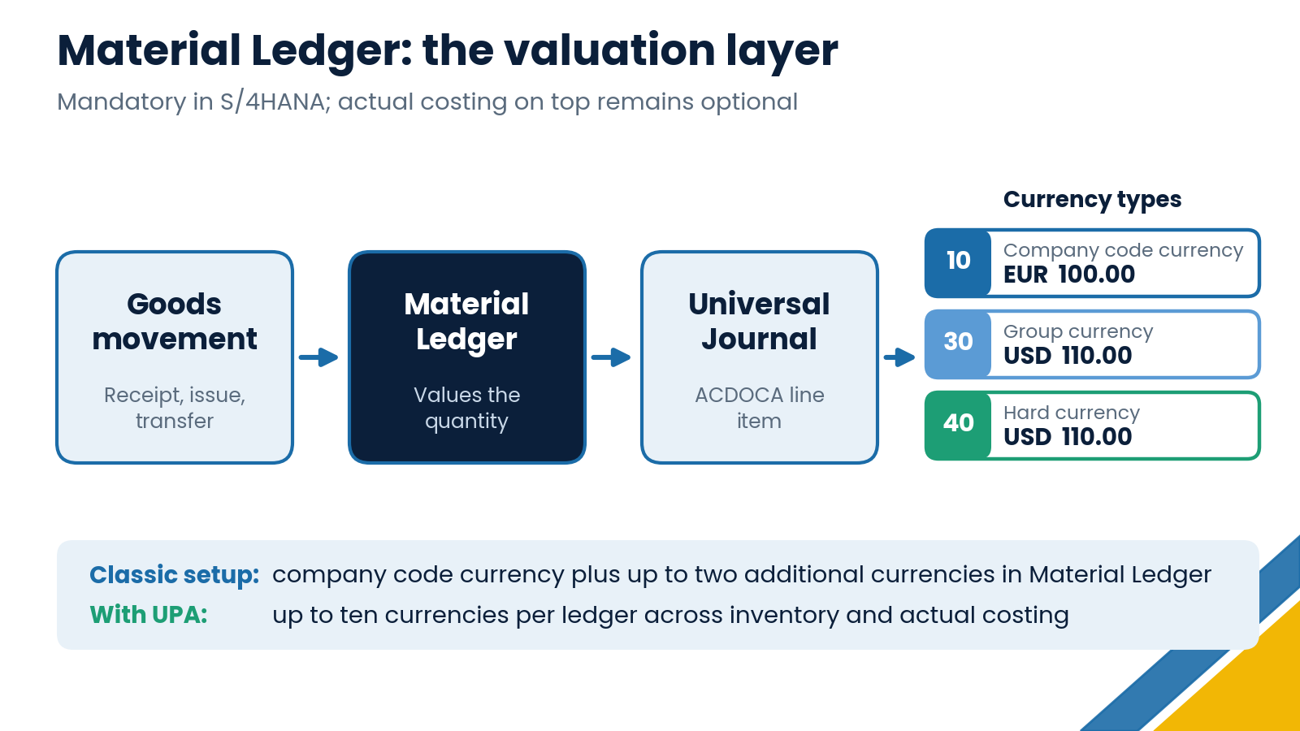
In SAP ECC, Material Ledger was an optional component that many manufacturers never switched on. In S/4HANA it is mandatory. Every goods receipt, goods issue and stock transfer is valued by Material and written to the Universal Journal (table ACDOCA) alongside the financial and controlling line items. What remains optional is actual costing, the periodic process that turns standard costs into actual costs. The valuation layer itself is always on.
How currencies are captured at posting
Each valuation area carries a currency and valuation profile that determines which currencies and valuation views Material Ledger maintains. In a classic setup, Material Ledger supports the company code currency plus up to two additional currencies, typically group currency (currency type 30) and a hard currency (currency type 40).
The important point is that each currency carries its own inventory value. Group currency inventory is not simply the local currency balance translated at the month end rate. It is built up movement by movement, at the rates that applied when each receipt posted. That is what makes inventory and cost of goods sold reconcile in every currency, not just in local currency.
Where finance teams see it
Because Material Ledger data now lives in ACDOCA, prices and values are available for reporting the moment they post. Material Price Analysis (transaction CKM3N) remains the go to view for a material's price history and value flow in each currency, while Fiori analytical apps and CDS views read the same line items directly, with no separate aggregate tables to reconcile.
Three Valuation Views, One Goods Movement
Multi valuation is where S/4HANA separates itself from a simple multi currency ledger. Using transfer pricing functionality, the system can carry the same material at three values at once:
A worked example
Take the machined housing from Stuttgart. It costs EUR 100 to make. Stuttgart sells it to the Chicago entity at a transfer price of EUR 130, and the exchange rate on the day of the movement is 1.10 USD per EUR. Internally, the profit center transfer price is set at cost plus 10 percent. When the housing lands in Chicago inventory, S/4HANA holds it at:
· USD 143 in the legal view, because that is what Chicago paid.
· USD 121 in the profit center view, reflecting the internal transfer price.
· USD 110 in the group view, because that is what the group actually spent.
Why it matters: The USD 33 difference between legal and group value is profit in inventory. With multi valuation active, that amount is identified and eliminated at posting, not estimated by a consolidation team weeks later. When the pump is finally sold, group margin analysis shows the true end to end margin in a single report.
All figures here are illustrative. Real transfer price models, markups and rates will vary by company and must follow your tax and transfer pricing policies.
Universal Parallel Accounting Changes the Rules
Universal Parallel Accounting arrived with SAP S/4HANA 2022 for on premise and private cloud deployments, and SAP has expanded its scope in the 2023 and 2025 releases. UPA rethinks parallel valuation so that every ledger, rather than every currency type, carries its own complete valuation. For costing, the headline changes are:
· Up to ten currencies per ledger across inventory, actual costing and asset accounting, compared with the long standing limit of three in Material Ledger.
· Ledger specific material prices, held in a new price table (FMLT_PRICE) and maintained through apps such as Change Material Prices and Upload Material Inventory Prices.
· Ledger specific standard cost estimates, using a costing variant per ledger, with each estimate marked and released separately.
· Actual costing runs per ledger, which removes the need for the Alternative Valuation Run that many groups used to produce group actuals.
· Group valuation as its own ledger, with intercompany goods movements valued at cost and profit in inventory eliminated through valuation clearing accounts.
· Profit center valuation based on transfer prices between profit centers, available since the 2023 release.
· Overhead and actual activity rates calculated per ledger, so cost of goods manufactured is correct in each accounting principle without a separate solution.
The catch: plan UPA, do not bolt it on
UPA is activated at system level and cannot be switched off once it is on. For greenfield implementations, that is a design choice made on day one. For existing S/4HANA systems, moving to UPA involves extensive prechecks and an SAP approval process, and localization coverage has been rolled out country by country. Before committing, confirm that every country in your footprint is supported in your target release and check the current SAP notes for restrictions that affect your processes.
If you are still on ECC or planning a new S/4HANA instance, UPA should be on the table in your design phase. Retrofitting it later is possible, but it is a project in its own right.
Actual Costing Across Borders
Standard costs are the right tool for planning and daily operations, but they are never exactly right. Aluminum prices move, freight costs spike, a supplier invoices in dollars while the plant books in pesos. Actual costing in Material Ledger captures those differences and assigns them to the materials that caused them.
How the costing run works
During period end closing, the actual costing run (transaction CKMLCP, or the Fiori equivalent) calculates a periodic unit price for each material, plant and currency. Through multilevel settlement, variances on raw materials roll up through semifinished products into finished goods, even when those steps happen in different plants and company codes. Revaluation of consumption then pushes the actual cost into cost of goods sold and margin analysis.
In our example, a price variance on aluminum bought in dollars for the Monterrey foundry does not stay stranded in Mexico. It flows into the cast housing, then into the machined housing in Stuttgart, and finally into the finished pump sold in Chicago, with the exchange rate component tracked separately from the pure price component.
Moving toward event-based posting
SAP is also shifting production cost accounting away from period end batch steps. Event based production cost posting records WIP and variances as confirmations and goods movements happen, and in SAP Cloud ERP (public edition) release 2408 the older period end closing for plant solution was discontinued in favor of this transaction-based approach. For controllers, that means fewer month end surprises and a clearer picture of actual costs during the period.
Intercompany Flows: Where Multi Valuation Pays Off
Intercompany supply chains are where multi valuation delivers the biggest return. Every time a material moves between legal entities, three things need to happen correctly: the selling entity recognizes revenue and margin, the buying entity values inventory at what it paid, and the group excludes that margin until the product leaves the group.
With legal and group valuation running in parallel, S/4HANA handles all three in the same posting. The group view never carries intercompany profit in inventory, and when the product is sold to a third party the group cost of goods sold already reflects true group cost. That gives finance teams a cleaner input to group reporting and gives tax and transfer pricing teams a clear record of cost basis by entity, which is increasingly valuable as tariff and customs valuation questions land on the controller's desk.
Six Decisions to Make Before You Configure
Multi-currency and multi valuation settings are among the hardest things to change after go live. These are the decisions we see matter most:
Currency strategy. Decide which currencies each ledger needs, including hard currencies for high inflation countries, and assign them consistently across Financial Accounting, Material Ledger and Asset Accounting.
Classic parallel valuation or UPA. Match the choice to your transformation path, release, country footprint and appetite for adopting newer functionality.
Price control by material type. Standard price for manufactured and most purchased materials gives the cleanest variance analysis; moving average price still has its place for some procured items.
Transfer price model. Agree how legal and profit center transfer prices are set, how often they change, and who owns them across finance, tax and operations.
Actual costing scope. Decide which plants and company codes join the costing run, and whether you need actual costs in every currency and valuation view.
Reporting by view. Design margin analysis, inventory reporting and group reporting so users can switch between legal, group and profit center values without spreadsheets.
Timing matters too. SAP ECC mainstream maintenance ends in 2027, so many manufacturers are finalizing S/4HANA designs right now. Decisions made in the next few months will shape how clearly those companies can see their global costs for the next decade.
How ERPfixers Can Help
ERPfixers specializes in SAP Finance and Controlling, with deep experience in Product Costing, Material Ledger, actual costing and parallel valuation on S/4HANA. Whether you are designing a new multi-currency landscape, evaluating Universal Parallel Accounting, or untangling group valuation in a system that is already live, our fixers help you get to cost numbers that every stakeholder can trust.
Contact ERPfixers today and, be sure to subscribe to our YouTube channel, where we share valuable webcasts and video series on a range of SAP topics.
📺Subscribe to our YouTube Channel
📧Send us an email Info@ERPfixers.com
📱Call us at +1 (302) 551-3627
📅Set an appointment today CALENDAR

